AI proposal generator
This AI proposal generator works in two steps. First, a free template engine writes a complete draft from your short form. Then you paste the client brief, and the AI step lists what the client asked for and rewrites the proposal in their words, using only your facts and the brief.
By The Clinchdraft team (Product and testing). Last updated .
How to use the AI proposal generator, step by step
- Pick the proposal type from the list, such as consulting, web design or event planning.
- Fill in the short form: you, the client, their goal, your deliverables, timeline and up to three prices.
- Press Generate to get the full draft, and fix any [placeholder] the form left open.
- Paste the client brief, RFP excerpt or job post into the tailoring box.
- Read the list of requirements, questions and deadlines it found, and which section answers each one.
- Finally, run the AI rewrite, check every changed section and download the Word file.
Generating a proposal is free and needs no account. Tailoring it to a client brief uses a credit, so see the pricing page for packs and plans, or read how we test the templates.
AI proposal generator tested with a real input
We ran a fictional business and client through this exact generator. Every number below comes from that run, including the size of the Word file the download button produces.
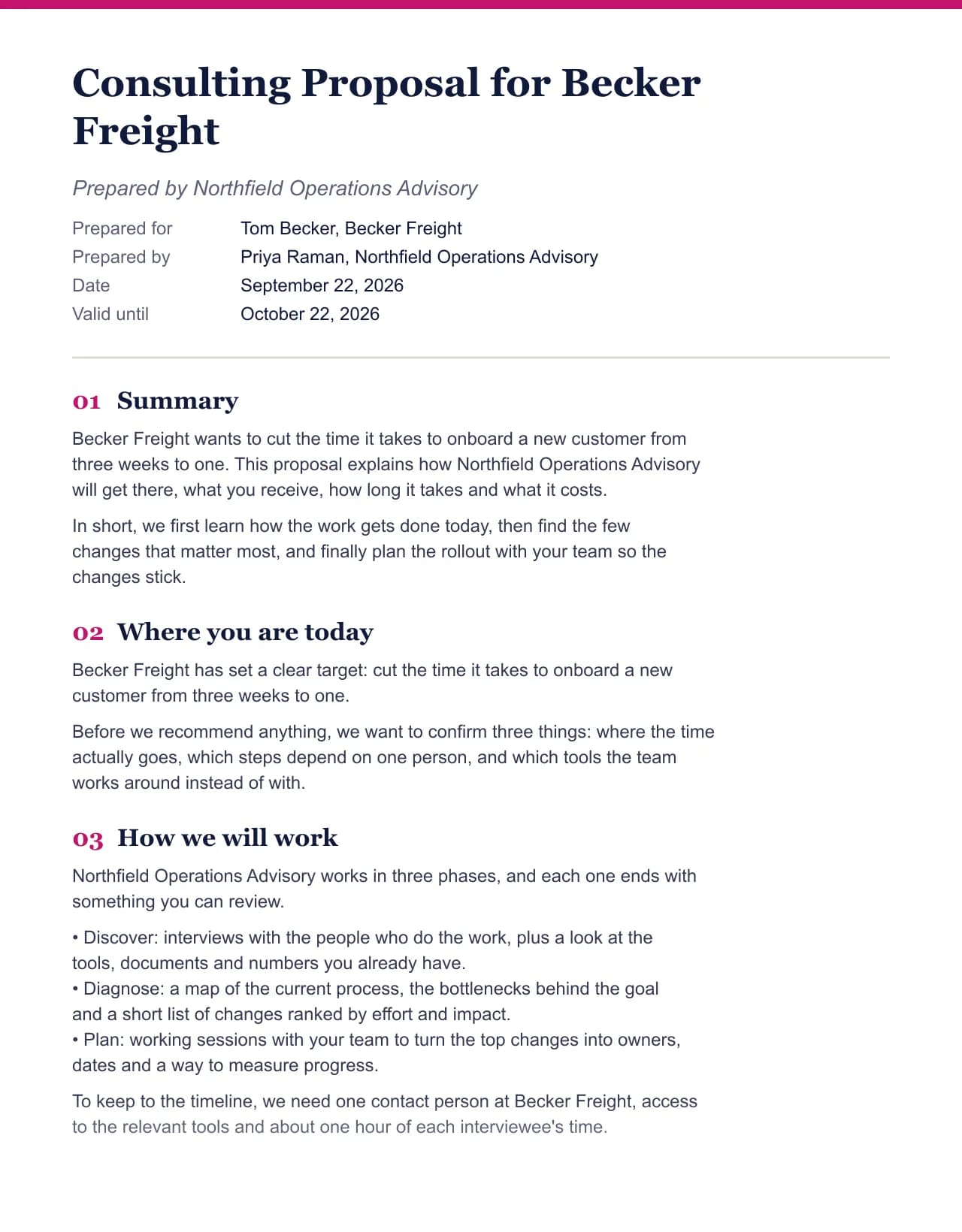
- Test input
- Northfield Operations Advisory (fictional) writing to Becker Freight, with the default deliverables and prices for this field
- Output
- Consulting Proposal, 9 sections
- Words
- 583
- Sections
- 9
- Price options
- 3
- Placeholders left
- 0
- Word file size
- 12 KB
- Generation time
- 24 ms
How we test: every page uses the same input, and we check each output by hand. More on the about page.
Why the AI proposal generator does not write the first draft
Most tools ask a language model to write the whole proposal from one line of text. That is fast, but the model has to guess everything you did not type. So it fills the gaps with plausible results, team sizes and past clients, and those guesses end up in front of a buyer.
We split the job on purpose. The first draft comes from a hand written section library for each of 19 fields, filled with your form. It calls no model, so it costs nothing, returns at once and cannot invent a fact. Anything you left empty stays in square brackets, where you will see it.
The AI part starts only when there is something real to work from: the client's own brief. At that point, the model has your facts, your draft and the client's words, and its job is to connect them rather than to make things up.
What the tailoring step reads in a client brief
When you paste a brief, the tool first reads it without any model. It pulls out the requirements (lines with must, should or need), the direct questions, the deadlines and any budget lines. Then it shows a table of each item and the section of your proposal that answers it. This part is free, so you can check coverage before you spend anything.
After that, the AI rewrite takes the mapped items and rewrites the affected sections. It mirrors the client's vocabulary, answers their questions where your proposal already has the facts and can move what they care about closer to the top. However, it does not add prices, dates, credentials or case studies that are not in your form or in the brief.
Each rewrite uses one credit, and the first three runs each day are free. If a run fails, the credit is returned. Your draft stays editable afterward, so you can undo any sentence you do not like.
The rules we give the AI, and what it will not do
The model gets three rules. Use only facts from the form and the brief. Keep every number exactly as you typed it. Leave a placeholder where a fact is missing instead of filling it in. These rules exist because a proposal is a promise, and a promise you did not make is a problem.
Also, the generator is not a proposal platform. It has no e-signature, no payment links, no view tracking and no CRM. You get the document: on screen, as Markdown, as a Word file or printed to PDF. If your process depends on signed links and open alerts, pair this AI proposal generator with the tool that already does that, or use a full platform.
Free draft and AI tailoring compared
| Step | What happens |
|---|---|
| Draft from the form | Template engine, no model call, free and unlimited |
| Missing facts | Shown as [placeholders], never guessed |
| Brief reading | Requirements, questions, deadlines and budget lines mapped to sections, free |
| AI rewrite | Sections rewritten in the client's words, one credit per run |
| Free AI runs | Three per day, no account needed |
| Exports | Copy as Markdown, Word file, print to PDF |
| Not included | E-signature, payment links, view tracking, CRM |
AI proposal generator FAQ
Is there a free AI proposal generator?
Yes. The full draft is free and unlimited, and the AI tailoring step gives you three free runs a day. Seeing what a brief asks for and which section answers it is always free.
Can AI write a business proposal for me?
It can write the words, but not the facts. That is why our tool builds the draft from your form and uses AI only to fit it to the client's brief, so the scope, prices and dates stay yours.
Will the AI invent results or testimonials?
No. The draft uses no model at all, and the rewrite is told to use only your form and the brief. Anything missing stays as a placeholder in square brackets.
What should I paste into the tailoring box?
Paste the client's brief, an RFP section, an email that describes the project or a job post. The more of their own words you paste, the better the mapping, up to 6,000 characters.
Can I edit the proposal after the AI rewrite?
Yes. Every section has an Edit button, both before and after tailoring. Then copy the text, download a Word file or print it to PDF.
Does it send or sign the proposal?
No. There is no e-signature, payment link or view tracking. You send the Word file or PDF yourself, which keeps the tool simple and cheap.