AI grant proposal generator
This AI grant proposal generator drafts a full grant proposal from a short form: summary, organization, need, objectives, methods, evaluation, budget notes and sustainability. Then you paste the funder's call or guidelines, and the AI step shows which requirements and deadlines your draft covers and rewrites it in the funder's language, using only your facts.
By The Clinchdraft team (Product and testing). Last updated .
How to use the AI grant proposal generator, step by step
- Keep Grant selected as the proposal type, and enter your organization and the funder's name.
- Write the project goal as a verb phrase, such as provide free tutoring to 60 middle school students.
- List the activities or outputs the grant will pay for, and enter the amount you are requesting.
- Press Generate and fill every [placeholder] in the need and evaluation sections with your own data.
- Paste the funder's call, guidelines or scoring criteria into the tailoring box to see what is still missing.
- Finally, run the AI rewrite if you want, then copy the text into the funder's portal or form.
Generating a proposal is free and needs no account. Tailoring it to a client brief uses a credit, so see the pricing page for packs and plans, or read how we test the templates.
AI grant proposal generator tested with a real input
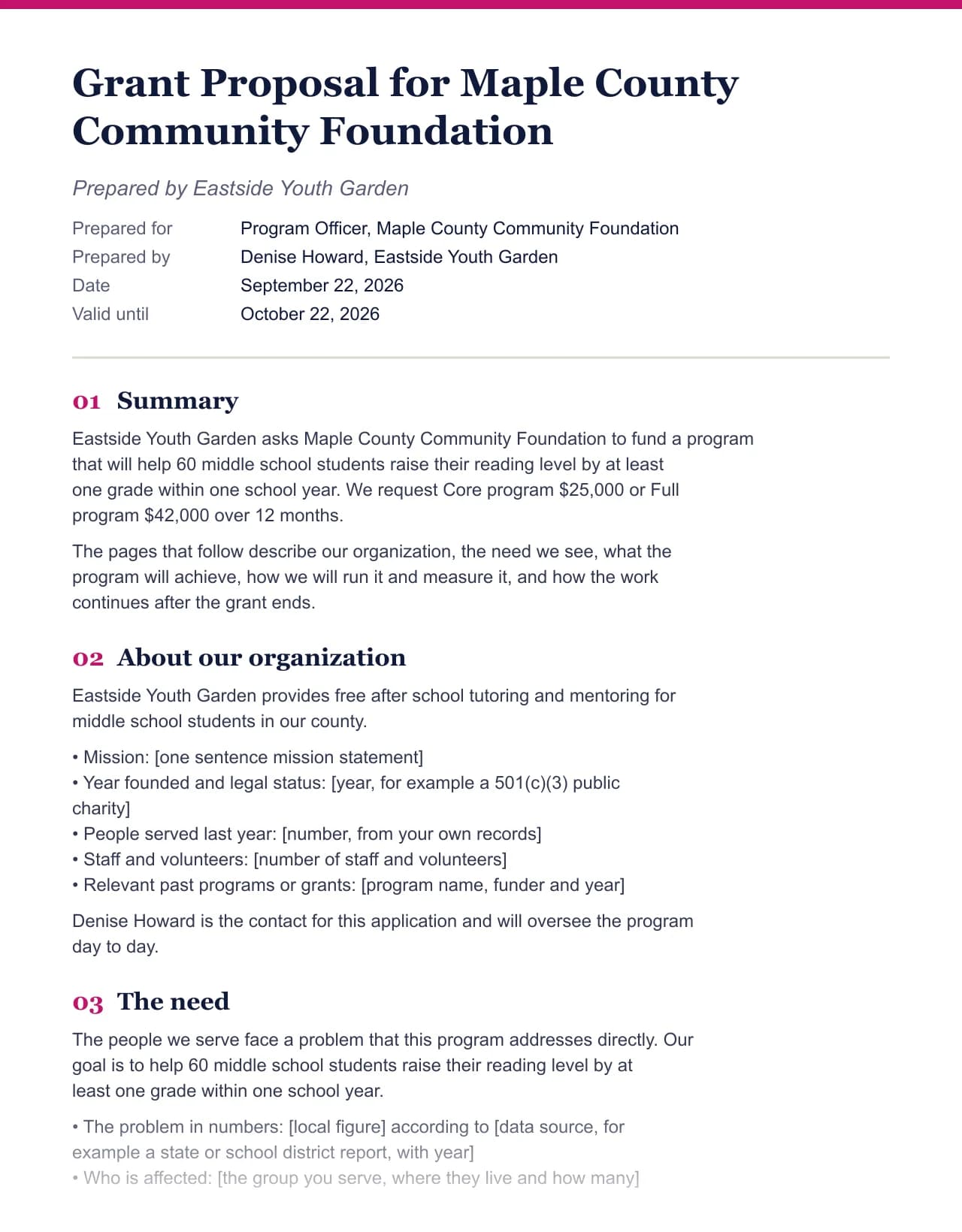
We ran a fictional business and client through this exact generator. Every number below comes from that run, including the size of the Word file the download button produces.
- Test input
- Eastside Youth Garden (fictional) writing to Maple County Community Foundation, with the default deliverables and prices for this field
- Output
- Grant Proposal, 10 sections
- Words
- 755
- Sections
- 10
- Price options
- 2
- Placeholders left
- 21
- Word file size
- 12 KB
- Generation time
- 1 ms
How we test: every page uses the same input, and we check each output by hand. More on the about page.
Why the AI grant proposal generator starts from a template
Grant reviewers read the need statement for evidence. An AI tool that writes the whole proposal from a one line prompt tends to fill that section with statistics that look right but have no source. In a grant, that is worse than an empty page, because reviewers often check.
So the first draft here comes from a hand written grant template filled with your form, with no model involved. The need statement, the baseline figures and the evaluation targets stay as [placeholders] until you add real data from your community, your records or a public source. Everything else, from objectives to sustainability, is already written around your goal.
The AI step comes second, and only after you paste the funder's own text. At that point, its job is narrow: match your facts to what this funder asked for.
Tailoring a grant draft to the funder's call
Every funder words its priorities differently, and reviewers score against those words. When you paste the call for proposals, the tool first lists its requirements, questions, deadlines and budget lines without any model. Next to each item, it shows the section of your draft that answers it, so you can spot a missing requirement before a reviewer does. That reading is free.
The AI rewrite then restates your objectives and methods in the funder's terms and can move the parts they score highest closer to the top. However, it keeps your amounts, dates and outputs exactly as typed, and it writes a placeholder instead of inventing a statistic. Each run uses one credit, and the first three runs each day are free.
Check the funder's rules on AI before you submit
Some funders now publish rules on how applicants may use AI tools, and a few limit it. Therefore, read the current guidelines of your funder before you use the rewrite, and disclose AI help if they ask for it. You remain responsible for every sentence you submit.
Also, most government and foundation grants are submitted through a portal with fixed fields and character limits. The generator does not submit anything or fill those portals for you. Instead, copy each section into the matching field, then trim it to the limit. For long federal applications with required forms, treat this draft as the narrative part only.
Grant proposal sections and what reviewers look for
| Section | What the reviewer checks |
|---|---|
| Summary | The request, the goal and the amount on one short page |
| About the organization | That you can deliver: mission, history and capacity |
| The need | Evidence of the problem, with sources you add |
| Goals and objectives | Specific, measurable targets tied to the need |
| Methods | The activities, who runs them and when |
| Evaluation | How you will measure results and report them |
| Budget notes | What each cost covers and why it is needed |
| After the grant | How the work continues when the funding ends |
AI grant proposal generator FAQ
Can AI write a grant proposal?
It can help with structure and wording, but the evidence has to come from you. Our AI grant proposal generator writes the narrative around your facts and leaves data points as placeholders.
Is using AI for grant writing allowed?
It depends on the funder. Some publish rules on AI use in applications, so read the current guidelines and disclose AI help when they ask.
What should I paste into the tailoring box for a grant?
Paste the call for proposals, the funding priorities or the scoring criteria, up to 6,000 characters. The tool maps each requirement and deadline to a section of your draft.
Does the generator invent statistics for the need statement?
No. The draft uses no model, and the AI rewrite is told to use only your facts and the funder's text. Missing numbers stay in square brackets.
Is the AI grant proposal generator free?
The draft, editing and the Word download are free with no account. The AI rewrite has three free runs a day, then uses credits.
Can it submit my application to Grants.gov?
No. It writes the narrative text only. You copy the sections into the funder's portal and complete their forms yourself.